

Two Laser Options, Infinite Possibilities


20W DIODE LASER ENGRAVER

Carverall X1 Pro | 20W Diode | 300*300mm

Let’s take a look at some of the interesting projects that X1 Pro users have created with their machines.


Project gallery: 1 / 9
HIGH SPEED
20W optical output and a 455 nm blue diode laser bring engraving and cutting to your desktop. Create signs, gifts and workshop projects with suitable materials and settings.

cOMPATIBLE WITH IR LASER
Switch to the compatible 1W red laser module to engrave metal and explore more creative possibilities.

Powerful Wood Cutting
Cut wood with ease and turn your ideas into signs, decorations, models, and more.

A sturdy gantry design provides greater stability and faster performance than conventional plastic-frame machines.

Wide materials range
Pair X1 Pro with the 1W red laser module to explore over 300 materials and bring more ideas to life.


From fine lines to intricate patterns, X1 Pro captures the details that make every creation stand out.


Carverall offers a simple to professional mode selection for your every engraving stage.

Mobile & PC Control
Create and control your projects with intuitive software, whether you’re working on a computer or your phone.

Available extensions
Explore a range of accessories to take on more materials, projects, and creative challenges.

Roller and Chuck
Use the rotary roller or chuck to personalize tumblers, bottles, and other cylindrical items.

More Included, More Possibilities
Get a free air pump and riser columns to expand what you can create from day one.

See what Youtube Pros say about Carverall X1 Pro
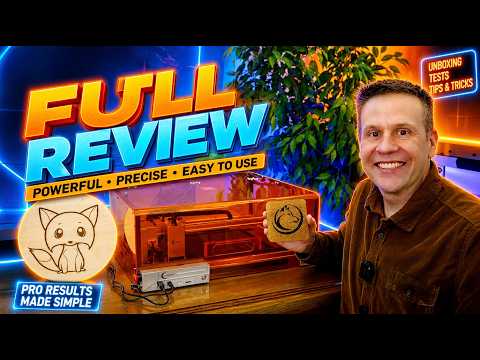

"Full in depth review the Carverall JL9 (AKA X1 Pro 20 watt laser machine).
After a brief unboxing and timed assembly Greg jumps in to 2 sample projects; one project engraving and cutting plywood and one project engraving a cork coaster! "


"A solid and simple laser engraver for anyone interested in getting one and getting some engravings off the ground. The 20W laser from Carverall should be able to engrave on a number of materials as well as cut through some woods, acrylics, leathers, and papers."
Watch on YouTube: GeekToyLove

“In questo video ti mostro come calibrare perfettamente gli assi X e Y del tuo laser a diodo Carverall JL9, e come eseguire una correzione precisa del Kerf per ottenere tagli millimetrici, incastri perfetti e risultati professionali.”
Watch on YouTube: Progettazione e Realizzazione

“Le JL9 / X1 Pro 20W propose une puissance de 20W, une zone de travail de 300x300 mm, l’assistance d’air (Air Assist) incluse et une compatibilité avec des logiciels comme LightBurn et LaserGRBL. Idéal pour le DIY, la création d’objets personnalisés ou une petite activité artisanale.”
Watch on YouTube: La chaine de Nico (Nico3D)

“20 Watt di potenza, un sistema di messa a fuoco mai visto prima e un montaggio così veloce da sembrare un gioco.
Oggi mettiamo sotto la lente il Carverall X1 Pro, un laser a diodo che promette di scuotere il mercato con soluzioni tecniche originali e un look che finalmente esce dal solito "total black".
Sarà davvero all'altezza della concorrenza? Scopriamolo insieme!"

| Overall Design & Structure | |
|---|---|
| Product Model | X1 Pro |
| Frame Material | High-strength anodized aluminum, stable mechanical structure |
| Machine Size | 470 × 470 × 160 mm |
| Engraving Area | 300 × 300 mm |
| Shield Cover | Optional protective enclosure |
| Net Weight | Approx. 4.7 kg |
| Laser Module | |
| Laser Type | 20W Diode Laser (Air-cooled) |
| Laser Power | 20W optical output |
| Wavelength | 455 nm (Blue diode) |
| Spot Size | Ultra-fine compressed spot for high-precision engraving |
| Laser Lifespan | > 10,000 hours (27°C environment) |
| Max Engraving Speed | 15,000 mm/min |
| Electronics & Control | |
| Input Voltage | DC 24V power supply |
| Data Transmission | USB wired & WiFi wireless |
| Mainboard | 32-bit MCU, GRBL-based control system |
| Software & Compatibility | |
| Supported Software | CutLabX, LightBurn, LaserGRBL |
| Operating Systems | Windows, macOS, Android, iOS |
| Supported Formats | JPG, JPEG, PNG, BMP, SVG, DXF, G-code, PLT |
| Supported Materials | |
| Engraving Compatibility |
Wood, Bamboo, Leather, Cardboard, Kraft Paper, Fabric, Slate, Stone, Rubber, Acrylic (coated), Painted Metal, Glass (coated), Anodized Aluminum, and more |
| Safety & Durability | |
| Safety Features |
Optional protective shield cover, goggles included, Limit-switch safety mechanism |
| Thermal Management | Air-cooled system for long-term stability |
| Optional Accessories | |
| Available Add-ons |
Rotary module, Air pump, Camera module, Protective shield cover, Riser extensions |
| What's in the Box | |
| Standard Accessories |
Power supply, Air Pump, USB cable, Goggles, TF card & reader, Marker, Cleaning brush, User manual, Test paper, Height risers |
Everything you need to know about the Carverall X1 Pro.
The X1 Pro can help you create personalized gifts, wooden signs, decorations, models, and more. With compatible accessories and laser modules, you can explore even more creative projects.
The X1 Pro has a working area of 300 × 300 mm, giving you space for a variety of engraving and cutting projects.
Yes. Its modular design makes assembly straightforward, so you can spend less time setting up and more time creating.
Yes. The X1 Pro can cut suitable wood materials for projects such as signs, decorations, and models. Cutting results depend on the material, thickness, laser module, and settings used.
Yes. The X1 Pro is compatible with a 1W red laser module for engraving suitable metal surfaces. Results may vary depending on the material and its surface finish.
Please check your selected package to see whether the 1W red laser module is included.
Yes. The X1 Pro supports quick changes between compatible laser modules, including the 1W red laser module, allowing you to adapt your setup for different projects.
With compatible laser modules, the X1 Pro can work with a wide range of materials, including wood and suitable metal surfaces. Material compatibility and results depend on the laser module and settings used.
Always check that a material is safe and suitable for laser processing before use.
Yes. You can use compatible software on your computer or phone to prepare and control your projects.
An air pump and riser columns are included with the X1 Pro. Please refer to the contents of your selected package for the complete list of items.
Yes. With a compatible rotary roller or rotary chuck, you can engrave suitable cylindrical objects such as tumblers and bottles. Please check your selected package to see which accessories are included.
The X1 Pro supports a range of compatible accessories, including rotary accessories and laser modules, to help you explore more projects. Please check the product page for available options and package contents.
Our team is here to help you find the right setup.
Overall rating: 4.7 / 5 from 87 reviews.

So far, the machine performs all the tasks assigned flawlessly. Provided with some learning curve, one can expect a lot from it. It's obedient, precise and efficient. I only can imagine how its capabilities can be broadened with some more perfection of my own skills in handling it. There are some flows in the original software supplied, the CutLabX: there are some tricky challenges in resizing its working window and setting up the cutting/engraving functions for a job. But, after a while, I've found these challenges possible to manage. Also, the controller wire chord which leads from the panel to the laser head is enveloped in a very rigid plastic tube which makes its motion somewhat stubborn and that can, potentially, cause those tiny wires it carries to start bending prematurely at their ends. Well, I've tried my best to pace/fix this cord such a way along the side of the enclosure so it would prevent this potential issue. So far, so good! I am mentioning these, quite manageable, issues in the hope that the designers of this machine would possibly make some notes and employ some changes into this laser's construction. I think that it also would benefit both, the customers and sellers, if there would be more official instructional videos provided which would show the best ways of performing assemblies and set-ups of this, very capable, a machine! Thank you, Carverall!
Carverall X1Pro 20W Diode Laser Engraver | Model JL9 | Work Area 300x300mm

I'm very satisfied! The engraving area of 10 x 0 cm is small, but sufficient for most things. You can't get both a huge engraving area and an ultra-compact machine. I also ordered the infrared laser head. All in all, an unbeatable price for a machine that engraves superbly and takes up very little space.
Carverall A1Pro Mini Laser Engraver | Portable & Desktop | Dual Laser Options

I purchased the X1PRO primarily to work on creative projects with my children and to craft simple handmade items together. Its spacious workspace provides ample room for us to experiment with a wide variety of creative ideas—keeping the children highly engaged while allowing them to acquire various skills through hands-on practice.
Carverall X1Pro 20W Diode Laser Engraver | Model JL9_Work Area 300*300mm

Recently, I set myself a rather ambitious challenge: to construct a wooden globe that could be manually rotated. This undertaking involved a great deal of intricate cutting and precise assembly; truth be told, I wasn't entirely confident at the outset and wasn't sure if I would be able to see it through to completion. The entire crafting process was time-consuming, but the experience of personally building it into a tangible form, step by step, was truly enjoyable. The X1PRO device I purchased from Carverall performed exceptionally well in cutting wood—effortlessly handling even the most complex and delicate components—which undoubtedly played a pivotal role in the project's success. Upon completing the piece, I realized with deep appreciation that this machine has truly opened up a world of infinite possibilities for me. Now, I am considering using this experience as a springboard to launch a small side business, specializing in the creation of various custom-made handcrafted items.
Carverall X1Pro 20W Diode Laser Engraver | Model JL9_Work Area 300*300mm

The X1PRO is perfect for making home decorations. I’ve been cutting various shapes and combining them into display pieces, and it handles larger patterns really well.It’s beginner-friendly but still powerful enough to get creative. My kids also like joining in, which makes it a nice family activity.
Carverall X1Pro 20W Diode Laser Engraver | Model JL9_Work Area 300*300mm

Ideal for small-scale wood carving projects—particularly for beginners and home users. Once set up, it is easy to operate and offers reliable performance; it also serves as a fun way for children to unleash their creativity.
Carverall X1Pro 20W Diode Laser Engraver | Model JL9_Work Area 300*300mm

I used the X1PRO to cut a hollow letter design, and the result turned out very clean. The machine handled the full design in one go, which saved a lot of time.Edges were sharp and details stayed intact. After a bit of setup, it works very reliably for custom patterns.
Carverall X1Pro 20W Diode Laser Engraver | Model JL9_Work Area 300*300mm

I bought the 7W version mainly for engraving wood, and it works really well. The details are sharp and clean, especially for small text. Setup was easier than I expected.

I use the A1PRO for various small commercial projects, mainly engraving on leather and coated metals. The level of detail is impressive, especially when engraving logos and tiny text. So far, the machine has proven to be extremely reliable.
Carverall A1Pro Mini Laser Engraver | Portable & Desktop | Dual Laser Options

The 7W is perfect for beginners like me. I mainly engrave leather patches and thin wood, and the results are very clean. Good value for the price.

Overall, this is a very solid machine. The A1PRO feels well-built and remains remarkably stable during operation. The resulting engravings are crisp and sharp.
Carverall A1Pro Mini Laser Engraver | Portable & Desktop | Dual Laser Options

The 12W model has more power than I thought. I’ve been using it on plywood and coated metals, and the results are consistent. Definitely a good upgrade if you need more cutting ability.

Using the 7W for custom gifts and it does a great job on wood. The engraving is precise and the machine feels stable during operation.

I chose the 12W version for better performance, and it didn’t disappoint. Faster engraving speed and cleaner cuts compared to my previous machine.

The presence of the camera makes batch engraving incredibly effortless. I can precisely position my designs without having to rely on guesswork, which reduces material waste and boosts my workflow efficiency. It’s a fantastic feature for production-oriented work.
Carverall A1Pro Mini Laser Engraver | Portable & Desktop | Dual Laser Options

Very happy with the 12W model. It handles thicker materials better and saves a lot of time. The engraving quality is still very detailed.

The camera feature on the A1PRO is an absolute game-changer for batch engraving. I can quickly align multiple items to be engraved—in this case, keychains—and achieve consistent results every single time. It has truly saved me a significant amount of time.
Carverall A1Pro Mini Laser Engraver | Portable & Desktop | Dual Laser Options

Its not the machine but the person using it. And that really relates to the software. And trial and error but i love it.

Great product!!!!
Carverall X1 Laser Engraver | Desktop with Protective | Dual Laser Option

Great laser engraver. Very fast construction and works precisely
Carverall X1 Laser Engraver | Desktop with Protective | Dual Laser Option

Solid build quality and accurate positioning. The blue laser produces sharp lines, and overall performance exceeded my expectations.
Carverall X2/K15 Pro Mini Portable Laser Engraver | 300*200mm

The A1Pro is compact but powerful enough for my Etsy shop needs. Setup was straightforward and the machine feels stable during operation.
Carverall A1Pro Mini Laser Engraver | Portable & Desktop | Dual Laser Options

The 300×300 working area gives me plenty of space for larger designs. While the laser is 20W, it still handles engraving efficiently and meets my needs for small business production. Great value for the price.
Carverall X1Pro 20W Diode Laser Engraver | Work Area 300*300mm

Solid entry-level blue laser engraver. The A1Pro offers good performance for the price. I’d love to see more accessories or enclosure options in the future.
Carverall A1Pro Mini Laser Engraver | Portable & Desktop | Dual Laser Options

Great value for a small blue laser engraver. It handles detailed designs well and runs smoothly even during longer sessions.
Carverall X2/K15 Pro Mini Portable Laser Engraver | 300*200mm

I’ve been using the X1 Pro mainly for leather and plywood projects. The 20W laser delivers precise details and consistent results. The machine runs smoothly and feels very well built.
Carverall X1Pro 20W Diode Laser Engraver | Work Area 300*300mm

The K15Pro is ideal for DIY and small business use. Compact size, stable performance, and consistent engraving quality.
Carverall X2/K15 Pro Mini Portable Laser Engraver | 300*200mm

I mainly use the A1Pro for hobby projects. It works great on wood and cardboard. Acrylic engraving is decent, though slower speeds give better results.
Carverall A1Pro Mini Laser Engraver | Portable & Desktop | Dual Laser Options

As a beginner, I found the X1 Pro very easy to learn. The software is intuitive, and the 20W laser produces sharp, clean engraving results on different materials. I’m very satisfied with the performance.
Carverall X1Pro 20W Diode Laser Engraver | Work Area 300*300mm

What I like most about the A1Pro is its consistency. Even after several hours of use, the engraving quality remains sharp. Cooling and noise levels are acceptable.
Carverall A1Pro Mini Laser Engraver | Portable & Desktop | Dual Laser Options

As a beginner, I found the K15Pro very user-friendly. The software is intuitive and the engraving results are clean and precise.
Carverall X2/K15 Pro Mini Portable Laser Engraver | 300*200mm

This is the best blue hoodie I've ever seen
Carverall X1Pro 20W Diode Laser Engraver | Work Area 300*300mm

The K15Pro is compact and easy to set up. The blue laser engraving quality is impressive on wood and leather. Perfect for small workshop projects.
Carverall X2/K15 Pro Mini Portable Laser Engraver | 300*200mm

I upgraded to the A1Pro from an older engraver and immediately noticed better precision. It handles fine text and logos very well, especially on plywood and leather.
Carverall A1Pro Mini Laser Engraver | Portable & Desktop | Dual Laser Options

Excelente para iniciantes e profissionais. O software é fácil de usar e os acessórios tornam a máquina muito versátil.

Montagem simples e rápida. Já gravei madeira, couro e até vidro com ótimos resultados.

A K15 Pro é incrível! Compacta, mas muito potente. O laser de 10W funciona muito bem em diferentes materiais.

Excelente precisión y resultados profesionales. La recomiendo para cualquiera que quiera empezar con el grabado láser.

Installation rapide et claire. J’ai pu graver du bois et du cuir sans problème. Excellent rapport qualité/prix.

Fácil de montar y de usar. El área de 300×200 mm es suficiente para la mayoría de mis trabajos artesanales.

Made for makers. Built for what comes next.


